 taskstaka
Help
The model
A task is one thing to do. It has a title, a context (work or personal), one stored status, and a parent if it has one. Every task is a markdown note in ~/todo/notes/; ~/todo/index.md is the generated tree, readable in Obsidian.
Nesting means "first this." A subtask is a prerequisite: something that must finish before its parent can. To bake an apple pie from scratch you must first invent the universe, so "invent the universe" goes under "bake the pie". Break work down from the end result backwards; you do the deepest open leaf first.
Siblings mean "and also this." Everything under one parent is independent and can be in flight at once; the parent finishes when all of them do. Siblings do not depend on each other. If you want to write "after the one above", nest it instead.
You store a status; taskstaka computes the rest. A task with open subtasks is blocked (▽) and stays out of your way. Its last subtask closes and it comes back resurfaced (↑ ready) at the top of Next. In a flat list you had to remember to go back for it.
Next is what you have to do now. The plate on top is the task in hand, the last one you started, with its notes. With nothing started it shows what is up next: the first ready row you have not picked up yet. Under the plate, each story is a stack: the rows you can do right now, then … N later, everything still required and why not yet.
The hand holds the task you are on. start takes a task in hand. done on it starts the next one in the same story: the parent if that was its last prerequisite, else the next sibling. put-back empties the hand and a different ready task comes up. First I need to… pushes a new prerequisite straight into your hand and pauses the one above it.
Waiting is on a person, and each wait carries a follow-up date (two days by default). chase records that you poked them and shortens the next one. reply records what came back: answered, declined, partial, or redirected to someone else. unblock means they answered and the task is back in your hand. A story stuck on a person shows ✉ Bo · 4d: who, and for how long. At 9:00 you get one digest of the people you are waiting on.
Someday parks a task: it does not block its parent and does not rank, but the parent cannot close until it is done or dropped.
| Stored status | means |
|---|---|
todo / doing | not started / started |
waiting | on a person, with a follow-up date |
someday | parked |
done / dropped | closed |
| Shown as | means |
|---|---|
▽ | blocked: has open prerequisites below it |
✉ Priya · 3d · 2× | waiting on a person, for how long, how many chases |
☐ | actionable: open, unblocked, not parked, yours to do |
↑ ready | resurfaced: its last prerequisite closed |
▶ in hand / ▶ up next | the plate |
🤖 | an agent's step, listed because you prompt it and check the result |
The CLI
taskstaka next                                  # what do I have to do now?
taskstaka add "Get DNS address"
taskstaka add "Create the zone" -p <id>          # a prerequisite under <id>
taskstaka add "Log in first" -p <id> --start     # push: goes straight in hand
taskstaka start <id> · done <id> · drop <id>
taskstaka put-back <id>                         # out of your hand without finishing
taskstaka wait <id> Sam                         # waiting on someone (follow-up +2d)
taskstaka chase <id> pinged again
taskstaka reply <id> redirected --to Bo "Bo owns DNS"
taskstaka unblock <id>                          # they got back to you
taskstaka waiting                               # who am I waiting on?
taskstaka someday <id>                          # park it
taskstaka touch <id> pinged Sam                 # journal a note
taskstaka edit <id>                             # open the note in $EDITOR
taskstaka quick "renew the cert #devops @Priya +3d"
taskstaka tui                                   # the always-on panel
taskstaka status · stop · restart
Ids are six characters; any unique prefix works. --json on anything gives machine output. Context filters and does not rank: next -c work.
The web
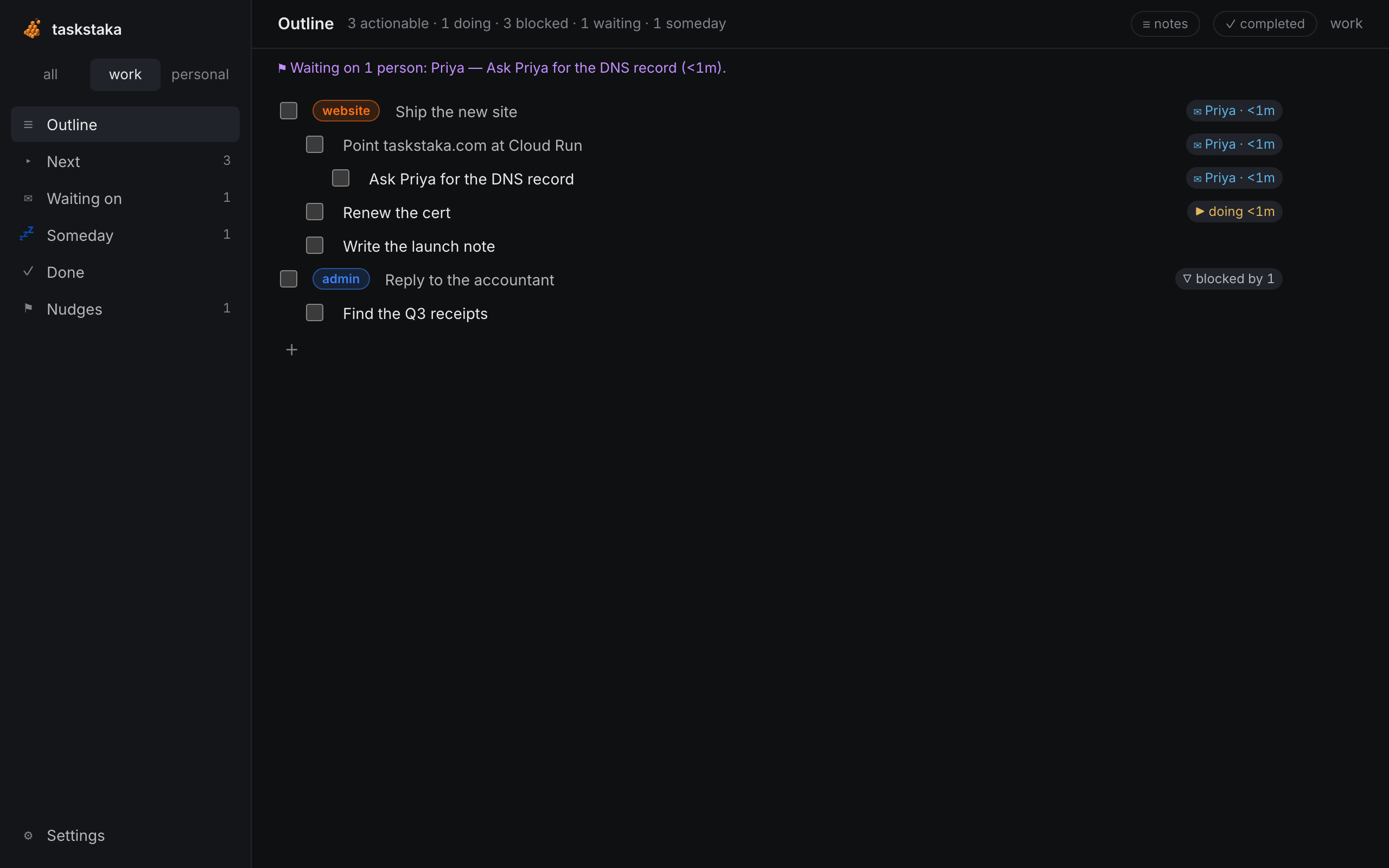
http://127.0.0.1:7407/. The sidebar has the contexts and the views: Outline, Next, Waiting on, Someday, Done, Nudges. Outline is a nested checklist: type a line, Enter for the next, Tab makes it a subtask, ⇧Tab outdents, tick the box to finish (a parent's box finishes its subtree). End a line with @Name to wait on them, +3d for the follow-up, #project to set the project. Bake a pie > Make the filling > Buy apples captures a whole stack in one line. n opens quick add anywhere.
Next shows the plate on top with editable notes and done, put back, first I need to… and wait actions, then each story as a stack. Hover a row for start and open; open slides in a pane with properties, subtasks, notes and history. Esc closes it. The pages work at half width and on a phone.
The TUI
taskstaka tui is the always-on panel, with five views on 1–5: Next, Outline, Waiting on, Someday, Nudges. On Next the plate sits in a box at the top: d done, p put back, i first I need to…, w wait on someone, l unfolds a story's later list. In the Outline ⇧ with the arrows rearranges, A adds under, h shows completed. Waiting on groups by person: f chase, u unblock. ? lists the keys. It refreshes live as other surfaces change the tree.
The menu bar
On macOS, taskstaka-tray shows the plate in the menu bar: ▶ title for the task in hand, ○ title for up next. Its menu reads like the plate: the title, its notes, then Done and Put back or Start, each row you can do now, Quick add… ⌥Space and Open taskstaka. ⌥Space toggles the quick-add panel from any app; Esc or clicking elsewhere hides it. Install it with taskstaka setup macos (see Install).
Agents
taskstaka setup claude gives Claude Code the MCP server and a skill that turns any multi-step plan into tasks: your manual steps with the exact command or draft message in the notes, its own steps tagged agent and closed as it goes, and anything that depends on a person created waiting on them. The MCP tools are plan, next, waiting, list_tasks, tree, get_task, add_task, set_status, update_task, move_task, touch, chase, record_reply, projects and nudges. The agent drafts any message into the task's notes; you send it.
A daily routine with a messages MCP alongside it:
For each item in
taskstaka.waiting(due=true): openwaiting_refif set, else search messages with the person for the task title. If they replied, callrecord_replywith a one-line summary. If silent, callchasewithdedupe=todayand draft a short follow-up for me to send.
Any MCP client can use the server: it is taskstaka mcp over stdio.